
Think about asking your phone to find a photo of a sunset at the beach without typing those exact words. Or searching for comfortable running shoes and getting results that truly match what feels comfortable to you, not just the words you typed. This is how vector search works.
When ChatGPT remembers the context of your conversation, Spotify suggests songs that fit your mood, or Google Photos finds pictures of your dog even if you never added a tag, that’s vector search in action. Let’s explain this powerful technology in a simple and easy-to-understand way.
How Does Vector Search Actually Work?
Let’s walk through this step by step, no computer science degree required.
Step 1: Everything Becomes Numbers
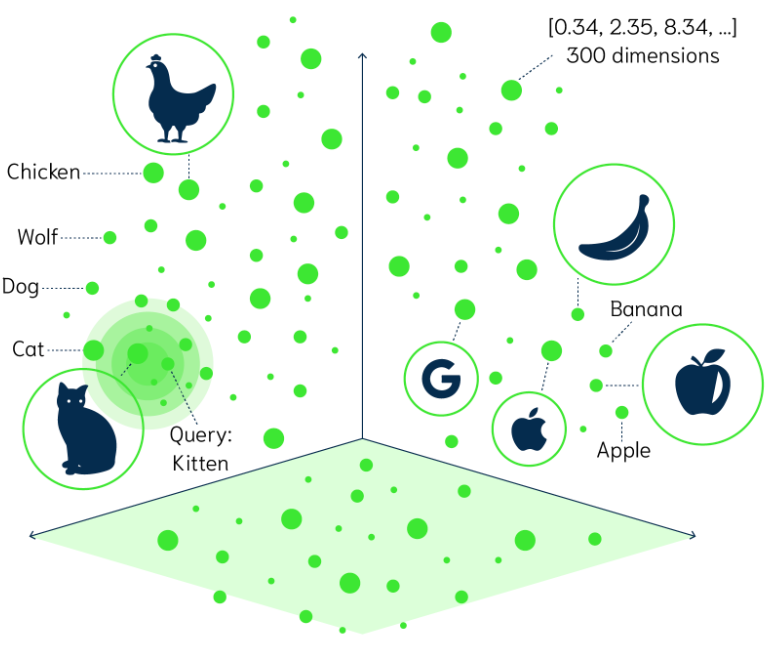
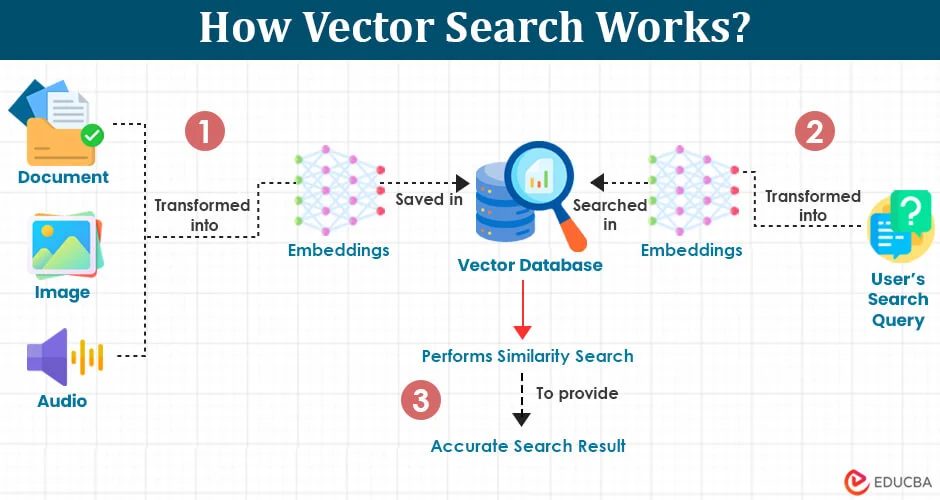
First, an AI model transforms your data into vectors. A vector is just a list of numbers, like coordinates on a map. For example, the word “cat” might become something like [0.2, 0.8, 0.1, 0.5]. The word “kitten” would have similar numbers because the meanings are related.
Step 2: Storing the Vectors
All these number lists get stored in a special database called a vector database. Popular ones include Pinecone, Weaviate, and Chroma. Think of it as a massive filing system organized by meaning rather than alphabetical order.
Step 3: Searching by Similarity
When you search for something, your query also gets converted into a vector. The system then finds the vectors in the database that are closest to yours, using mathematical calculations to measure similarity. It’s like finding your nearest neighbors on that giant map.
Step 4: Getting Your Results
Finally, the system shows you the results that matched your query best, ranked by how similar they are. The closest matches appear first.
Real-Life Examples You Interact With Daily
Vector search isn’t some futuristic concept. You’re probably using it multiple times a day without realizing it.
Netflix and Spotify Recommendations
When Netflix suggests “Because you watched Stranger Things,” it’s using vector search. The system understands that if you liked one sci-fi thriller with ’80s nostalgia, you might enjoy similar shows. It’s not just matching genres, it’s matching the feeling and themes.
Smart Photo Search
Google Photos lets you search for “beach” and finds all your beach photos, even if you never labeled them. The AI has converted each image into vectors that capture what’s in the picture. When you search, it finds visually similar images.
Shopping Recommendations
Amazon’s “customers who bought this also bought” feature uses vector search to understand product relationships. If you buy hiking boots, it knows you might need waterproof socks, not because they’re in the same category, but because they’re contextually related.
AI Chatbots That Remember
ChatGPT and similar AI assistants use vector search to remember your conversation. When you reference something from earlier in your chat, the AI searches through vectors of your conversation history to find relevant context.
Why Vector Search Matters for Modern AI
Vector search is the backbone of many AI breakthroughs we’re seeing today.
Better Understanding of Context
Unlike old search methods that just matched keywords, vector search understands context and nuance. It is known that “bank” near “river” is different from “bank” near “money.” This contextual awareness makes AI interactions feel more natural and human.
Handling Multiple Data Types
Vector search works with text, images, audio, and video all at once. This is called multimodal search. You can search with a picture and get text results or hum a song and find its name. Everything is converted into numbers and stored in the same vector space.
Powering Retrieval Augmented Generation (RAG)
This is a trending technique where AI models use vector search to find relevant information before generating answers. Instead of relying only on training data, the AI can search through updated documents, making responses more accurate and current.
Practical Tips for Understanding Vector Search Better
If you want to explore vector search yourself, here are some beginner-friendly ways to get started.
Try OpenAI’s Embeddings Playground
OpenAI offers tools where you can paste text and see how it gets converted into vectors. Play around with similar phrases and watch how their vector representations compare. It’s eye-opening to see the numbers behind the meaning.
Use Vector-Powered Apps
Tools like Notion AI, Perplexity, and Claude use vector search under the hood. Pay attention to how they understand your questions even when you phrase things differently. Notice how they pull relevant information from your notes or the web.
Understand Semantic Similarity
Start thinking about concepts in terms of meaning rather than exact matches. When you’re searching for something, consider what you really mean, not just the specific words. Vector search rewards this kind of thinking.
Explore Vector Databases
If you’re feeling adventurous, check out beginner tutorials for Pinecone or Weaviate. Many offer free tiers and simple examples that walk you through building a basic semantic search application. No coding experience required for some visual tools.
Common Questions About Vector Search
Is vector search always better than regular search?
Not always. If you’re looking for an exact phone number or a specific date, traditional keyword search works perfectly. Vector search shines when meaning and context matter more than exact matches.
Does vector search understand my language?
Modern embedding models work in over 100 languages and can even understand relationships between languages. You can search in English and find relevant results in Spanish if that’s what you need.
Is my data private with vector search?
That depends on the service you’re using. Many vector databases can be self-hosted, giving you complete control.
The Future of Vector Search
Looking ahead, vector search is becoming the foundation for how we interact with information.
More Personalized Experiences
Imagine search results that adapt to your preferences and context automatically. Vector search will power truly personalized AI assistants that understand your unique needs without you having to explain them every time.
Better Medical Diagnosis
Healthcare is exploring vector search to match patient symptoms with similar cases in medical databases. This could help doctors make faster, more accurate diagnoses by finding patterns across millions of patient records.
Smarter Content Creation
Writers and creators will use vector search to find inspiration, check for similar existing content, and discover unexpected connections between ideas. It’s like having a research assistant who understands nuance.
Real-Time Translation and Understanding
Vector search is improving real-time translation by capturing not just words but cultural context and idioms. Future translation tools will feel less robotic and more naturally conversational.
Conclusion
Vector search is the invisible technology that makes our digital experiences smarter and easier to use.It’s the reason AI feels less like talking to a computer and more like having a conversation with someone who actually gets what you mean.
You don’t need to understand all the complex math behind it to appreciate how it’s changing the way we find information, get recommendations, and interact with AI. Whether you’re using a smart assistant, browsing Netflix, or searching through your photos, vector search is quietly working in the background to make everything just a little bit more magical.

The best part? This technology is still in its early days. As vector search continues to improve, our interactions with computers will become even more natural and helpful. We’re moving toward a future where you won’t need to think about how to search for what you want. The technology will simply understand you.